
The TSC recruitment portal is the official online route for applying for advertised Teachers Service Commission vacancies. First identify whether you are applying for entry-level teacher recruitment, an internship, a promotion or a Secretariat job because TSC uses different pages. Read the current advert, use only a tsc.go.ke address, submit once, and save any acknowledgement or reference shown after submission.
Table of Contents
Official TSC recruitment portal links
| Applicant or task | Official page | What to expect |
|---|---|---|
| Permanent or internship teacher recruitment | TSC Online Recruitment Portal | Opens only during an advertised recruitment exercise. |
| Promotion adverts for serving teachers | TSC E-Recruitment Center | Displays active adverts, requirements, vacancies, opening dates, closing dates and an Apply action. |
| General Teachers Online services | TSC Teachers Online | Links to teacher registration, promotion adverts, deployment modules and other official services. |
| Secretariat vacancies | Secretariat Recruitment Portal | Uses a separate account. Registration asks for an ID number, phone number and email address. |
Before using the TSC recruitment portal, you can check a wider directory of Commission systems in our TSC Online Services guide. Do not use a registration-status checker to follow a job application; teacher registration and recruitment are separate processes.
Which TSC vacancy are you applying for?
The TSC recruitment portal is not one universal form for every vacancy. The phrase “TSC recruitment” covers several processes. Choosing the wrong portal is one of the main reasons applicants cannot find a vacancy or receive an invalid-details message.
Permanent and pensionable teacher jobs
These are entry or replacement teaching posts advertised for qualified, registered teachers. TSC normally opens the dedicated recruitment system for the stated application period. When the window closes, the page may show that the portal is closed, and you cannot start a new application until another official exercise is announced.
Teacher internships
Internship recruitment is a separate engagement from permanent appointment. Use the advert-specific link and read the terms before applying. Do not assume that an internship advert has the same qualifications, stipend, duration, selection method or conversion arrangement as a previous exercise.
Promotions for serving TSC teachers
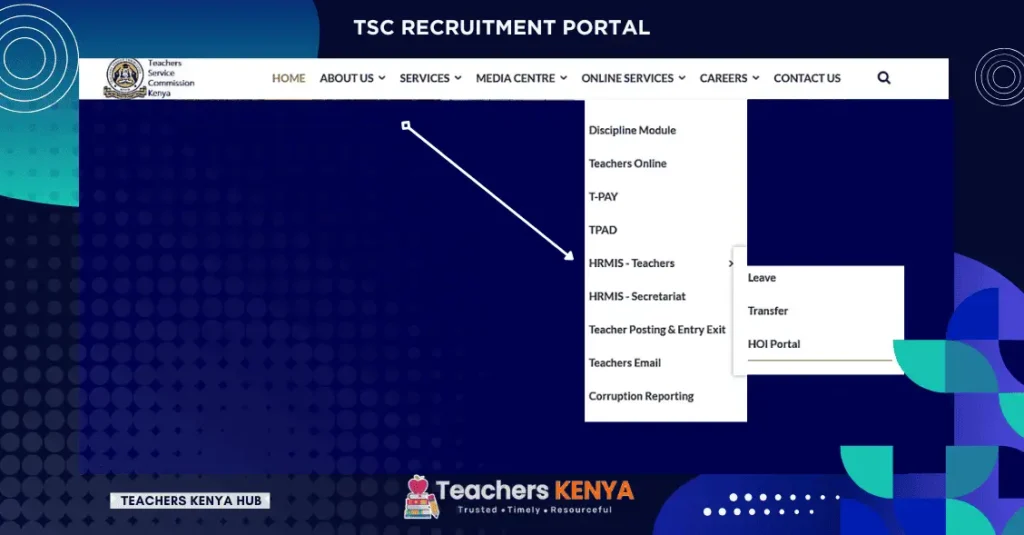
Promotion adverts are listed in the E-Recruitment Center. Each row shows the advert number, grade, number of vacancies, requirements and deadline. The current application page verifies the applicant using surname, ID or passport number and TSC number. A valid TSC number and ID record are required before the applicant can proceed.
Secretariat jobs
Secretariat positions use a different recruitment account from teacher recruitment. New users register with an ID number, phone number and email address, then sign in using their ID number and password. Use the password-recovery link on the same official portal if you lose access.
Requirements before you apply
There is no single document checklist for every vacancy handled through the TSC recruitment portal. The exact advert controls. Before opening the application form, confirm the following:
- You meet every academic, professional, subject, experience or service requirement stated in the advert.
- Your TSC registration is valid where the post is restricted to registered teachers. Applicants who still need a number should first follow the TSC number application process.
- Your surname, national ID or passport number and TSC number match the Commission’s records.
- Your phone number and email address are active where the portal or advert requests them.
- You have clear copies and originals of any documents specifically named in the advert for uploading, verification or interview.
- You know the correct closing date and time. Do not rely on a social-media poster without checking the official advert.
If your TSC number has not been issued or your registration record is still being processed, check it through the TSC registration status guide. A registration-status result is not an employment decision.
How to use the TSC recruitment portal
The TSC recruitment portal screens can change between recruitment exercises. Follow the labels shown in the live system and the instructions in the current advert.
- Confirm that the application window is open. Open the official advert first. If the entry recruitment page says the portal is closed, do not use an unofficial alternative.
- Read the entire advert. Check the post, terms of service, qualifications, target group, vacancies and deadline. An applicant who does not meet an advert requirement should not assume the system will correct the application later.
- Open the correct official portal. Use the permanent or internship recruitment page, promotion E-Recruitment Center or Secretariat portal according to the vacancy type.
- Enter your identifiers exactly. Use the same surname, ID or passport number and TSC number held in your official records. Do not add spaces, extra characters or a different name order unless the page asks for it.
- Select the advertised vacancy. Where the recruitment form asks for a county, sub-county, institution, subject or vacancy, choose only from the options displayed. The available selections depend on the specific exercise and may not appear when a window is closed.
- Complete every required field. Review contact details, qualifications and vacancy choices. Upload only the documents and file formats requested on the live page.
- Review before final submission. Correct spelling, numbers and selections while the form is still editable. A wrong county, sub-county, subject or advert can place the application in the wrong recruitment stream.
- Submit once and keep evidence. Save or print any acknowledgement, reference number, summary or confirmation page shown. If the portal provides an application-history page, check that the application appears there before trying again.
Expected result: A successfully completed TSC recruitment portal application should produce a portal confirmation, record or other evidence determined by that recruitment exercise. TSC states that its online advertised-post system can be used to follow processing up to appointment. Status wording and available tracking screens may differ between exercises.
How to check TSC recruitment portal application status
To check a TSC recruitment portal application, return to the same official system used to submit it. Do not enter your ID number in the teacher-registration checker and expect it to show a recruitment decision. For promotion applications, open the relevant advert or applicant route in the E-Recruitment Center. For entry recruitment, use the recruitment portal when the exercise provides applicant access.
| What you see | What it may mean | Next action |
|---|---|---|
| Portal closed | No new entry recruitment application can be started through that page. | Check the TSC website and official advert pages for a new window. |
| No application record | The submission may not have completed, or the identifiers entered may not match the record. | Check your saved confirmation and retry only if the official system shows no completed application. |
| A processing stage or status | The application has reached the stage named by that specific system. | Follow the instructions shown and wait for official communication. |
| Interview or verification notice | You may have been selected for the next stage, subject to the notice being genuine. | Confirm the advert number, venue, date and required originals through official TSC channels. |
| No update after the deadline | Processing or shortlisting may still be underway; absence of an update is not proof of success or rejection. | Check the portal and official TSC or county communication rather than paying an intermediary. |
TSC does not publish one universal meaning for every recruitment status across all systems. Treat the wording on the live portal and the current advert as the authoritative instruction.
How to correct a TSC recruitment portal application
Correct mistakes in the TSC recruitment portal before pressing the final submit button whenever the form allows editing. After submission, the available correction route depends on the recruitment exercise.
- Check whether the portal has an Edit, Update, Withdraw or Application History option.
- Do not create several applications to “cancel out” a mistake unless the advert or portal expressly allows a replacement submission.
- Keep the advert number, your TSC number, ID number and application reference ready when contacting support, but never publish these details in a public comment or group.
- For an identity or registration mismatch, correct the underlying TSC record through the relevant official service rather than altering documents.
- Where the advert routes recruitment through a county or sub-county office, use that office for exercise-specific clarification.
For general adverts and promotions enquiries, TSC Teachers Online currently displays telephone 020 289 2000 and email info@tsc.go.ke. Do not send passwords, OTPs or full document scans in an unsolicited email.
Common TSC recruitment portal errors and fixes
| Error or problem | Likely cause | Safe fix |
|---|---|---|
| “Recruitment Portal is closed” | The entry application window is not active. | Wait for an official advert. A third-party site cannot open the TSC system. |
| Invalid TSC number or ID | Details do not match TSC records, or the advert is restricted to a different applicant group. | Re-enter the exact official details and confirm your registration record. |
| Vacancy is missing | You may be on the wrong portal, the advert may have closed, or the position may not be available for your selection. | Return to the official advert and use its Apply link. |
| Page reloads without submitting | A required field, file or declaration may be incomplete, or the connection may have failed. | Read the validation message, complete the missing field and submit once on a stable connection. |
| Upload rejected | The file may exceed the allowed size or use an unsupported format. | Use the file type and size stated on the live form; keep the document readable. |
| No confirmation appears | The final request may not have reached the system. | Check application history or log in again before making a second submission. |
| Forgot Secretariat password | The separate Secretariat account password is unavailable. | Use the official “Forgot Password” link and follow the ID-number recovery process. |
Avoid repeated submissions during slow traffic. Save your work where the portal permits, use an updated browser, clear only the relevant browser cache if a stale page persists, and never bypass a browser certificate or security warning.
Merit lists, shortlisting and interviews
A merit list or shortlist belongs to a specific recruitment exercise. It reflects the applicable advert, verified qualifications and selection process; appearing on a list does not by itself equal appointment. TSC may require further document verification, interview steps or formal appointment communication.
Scoring rules and tie-breakers can change between exercises. We do not recommend using an old score sheet to predict a current result. Use only the guidelines attached to the current recruitment notice or instructions issued by the responsible TSC office.
When a list circulates on WhatsApp or Facebook, verify the advert number, county or sub-county, publication source and date. A genuine shortlist should not demand money for inclusion, interview access or appointment.
TSC recruitment security and scam warning
- TSC states that no payment is required for an online advertised-post application.
- Use addresses ending in
tsc.go.keand reach the application page through the TSC website or the official advert. - Never share your password, OTP, full ID image, TSC certificate or application reference in a public group.
- Do not pay a person who promises a vacancy, shortlist position, transfer, interview score or appointment letter.
- Do not bypass SSL, certificate or browser security warnings. Close the page and confirm the official link.
- An online application does not require a hard-copy submission to the Commission unless the specific advert later directs applicants to present or file documents for another stage.
Frequently asked questions
Is the TSC recruitment portal open?
The entry-level TSC recruitment portal was closed when checked on 30 July 2026. Promotion adverts are open on a separate E-Recruitment Center. Always verify the status on the official page because windows change.
What is the official TSC recruitment portal login?
For permanent or internship applications through the TSC recruitment portal, use hrmis.tsc.go.ke/app2/login when TSC opens it. Serving teachers applying for promotions should use the advert-specific Apply link at services.tsc.go.ke/adverts.
Can I apply without a TSC number?
Teacher vacancies and current promotion forms require a valid TSC registration record or TSC number. Secretariat vacancies are separate and may use an ID-based account. Read the exact eligibility section before applying.
Does TSC charge an application fee for recruitment?
No payment is required for an online advertised-post application according to TSC Teachers Online. This is different from fees that may apply to a separate teacher-registration service.
Can I apply using a phone?
You may use a capable mobile browser, but document uploads and reviewing long forms are often easier on a computer. Whichever device you use, submit through the official domain and save the confirmation.
How do I know whether my application was submitted?
After using the TSC recruitment portal, look for the confirmation, summary, reference or application record produced by that exercise. If none appears, check the application-history or tracking page before submitting again.
Can I change the county or sub-county after submission?
Only if the live portal provides an edit, withdrawal or replacement option, or TSC gives an official correction route. Do not assume a second application automatically replaces the first.
Where can I read more about promotions?
Use our separate TSC promotions application and status guide for promotion eligibility, applications, interviews and status checks.
Related TeachersKE guides
- TSC Online Services: official portal directory
- TSC number application requirements and certificate
- Check and interpret TSC registration status
- TSC promotions, interviews and status
- Teacher salaries and allowances by TSC grade
Official sources
- Teachers Service Commission Teachers Online — advertised posts, official links, fee warning and contact details; checked 30 July 2026.
- TSC Online Recruitment Portal — current entry recruitment portal status; checked 30 July 2026.
- TSC E-Recruitment Center — active promotion adverts, requirements and deadlines; checked 30 July 2026.
- TSC Secretariat Recruitment Portal — account registration, login and password recovery; checked 30 July 2026.
- Teachers Service Commission website — official Commission service directory and recruitment information; checked 30 July 2026.
